Web Page Layout #5
Tutorial on How to Design a Web Page
We have developed a simple way for beginners to design their own web page template using division tags and CSS (style sheets).
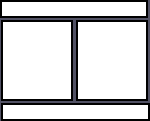
Our first layout pictured on the right consists of 2 columns created using nested divisions followed by a separate division for the footer.
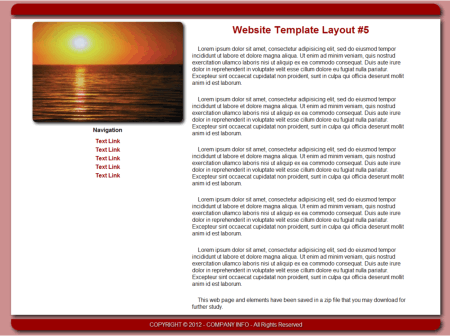
The basic HTML code without content is shown on the right. Alignment of columns, color and font properties are all set using the style sheet, layout5.css. |
|
The CSS Layout #5
/* remove all default padding and margins */
* {
padding: 0;
margin: 0
}
/* set fonts default fore and background colors */
body {
color: #0e0e0e;
background: #ffffff;
font-family:arial, verdana, tahoma, times new roman, serif;
font-style: normal;
font-weight: normal
}
/* set size of main division and position */
#main {
width: 100%;
float: left;
}
/* define size of left division and position */
#left {
width: 35%;
margin: 0 0 0 5%;
float: left;
}
/* define size of right div and position */
#right {
width: 55%;
margin: 0 5% 0 0;
float: left;
}
/* define size of footer div and add color */
#footer {
width: 90%;
float: left;
margin: 0 5% 0 5%;
background: #990000
}
/* Liquify images */
img {
max-width: 100%
}
#header-image {
border: none;
}
/* set font properties of h1 tag in right div */
#right h1 {
font-size:18px;
text-align:center;
color:#990000;
}
/* set font properties of paragraph tag in right div */
#right p {
font-size: 16px;
padding: 2% 4% 2% 4%;
text-indent: 16px
}
/* set font properties of paragraph tag and links in left div */
#left p {
font-size: 16px;
padding: 1% 0 1% 0;
text-align: center;
}
/* define color of links in left div and remove underline */
#left a {
/* remove underline */
text-decoration:none;
font-weight: bold;
color:#990100;
line-height: 150%
}
/* define hover or rollover color for links in left div */
#left a:hover {
color:#0e0e0e;
text-decoration: underline
}
/* define font properties for address tag in footer */
address {
font-size: 12px;
text-align:center;
color:#efefef;
padding: .5% 0 .5% 0
}
Kit and More Information
You can download the web page code , style sheet and images in a zip file for further study.
Download Layout5.zip
Use these lessons in our HTML tutorial to get a better understanding of building web pages with division tags and CSS.
The Division Tag
The ID Attribute
More Web Page Resources
You can get a logo for your web page made free at our Web Graphics Gallery.
Get your navigational buttons at our Button Gallery or go to Creating Buttons With CSS